By using this site, you agree to the Privacy Policy and Terms of Use.
Accept
Starr FMStarr FMStarr FM
  • Home
  • Election Hub
  • General
    GeneralShow More
    W/R: Prioritise competence, put party unity above personal interests – Afo-Toffey to NDC delegates
    November 14, 2026
    NDC goes to polls today to elect regional executives
    November 14, 2026
    AU Commission Chairperson commends Mahama, pledges support ahead of AU Chairmanship
    November 13, 2026
    2027 Budget: Ghana’s GH¢61bn debt interest bill exceeds allocations to key growth sectors – Oppong Nkrumah
    November 13, 2026
    Two teachers remanded over alleged sodomy case at Aduman SHS
    November 13, 2026
  • Business
    BusinessShow More
    Oppong Nkrumah accuses Ato Forson of borrowing New Economy ideas from Ofori Atta’s Ghana CARES
    November 13, 2026
    2027 Budget: Ghana’s GH¢61bn debt interest bill exceeds allocations to key growth sectors – Oppong Nkrumah
    November 13, 2026
    Western Regional Minister lauds Heath Goldfields for improved operations, local investment
    November 13, 2026
    Heath Goldfields spends GH¢763m on local procurement in first year of operations
    November 13, 2026
    Government spending more on itself while cutting support for the poor – Amin Adam
    November 13, 2026
  • Politics
    PoliticsShow More
    W/R: Prioritise competence, put party unity above personal interests – Afo-Toffey to NDC delegates
    November 14, 2026
    Buem NPP Parliamentary Candidate aspirant donates items worth GH¢35,000 to three institutions
    November 14, 2026
    NDC goes to polls today to elect regional executives
    November 14, 2026
    AU Commission Chairperson commends Mahama, pledges support ahead of AU Chairmanship
    November 13, 2026
    Oppong Nkrumah accuses Ato Forson of borrowing New Economy ideas from Ofori Atta’s Ghana CARES
    November 13, 2026
  • Entertainment
    EntertainmentShow More
    Social Fest: Chef Abby urges content creators to build influence beyond social media numbers
    November 14, 2026
    BlackStar Fashion Week: Stakeholders call for stronger IP protection for Ghana’s cultural products
    November 13, 2026
    Govt unveils $1 billion tourism blueprint to build year-round visitor economy
    November 12, 2026
    Chef Abbys arrives in US ahead of Social Fest Texas
    November 12, 2026
    Africa World Airlines partners Revealed: The New Era 2.0 to promote Ghana, Africa tourism
    November 11, 2026
  • Sports
    SportsShow More
    Black Stars bounce back with 2-0 victory over Somalia to revive AFCON 2027 hopes
    November 13, 2026
    Kudus and Ayew return as Björkegren names Black Stars squad for Somalia double-header
    November 9, 2026
    Stanbic-Asantehene Invitational Golf Tournament strengthens relationships and excellence through sport
    November 9, 2026
    Only five of 31 second-raffle winners secured U.S. visas
    November 6, 2026
    “Ghana can be proud”: French Ambassador backs Black Challenge’s World Cup dream
    November 4, 2026
  • Technology
    TechnologyShow More
    Samuel Nartey George elected Chair of AU Communications and ICT Committee
    October 29, 2026
    AVAS 2026: Accra to Drive Africa’s Tokenisation Agenda
    October 28, 2026
    Yellow Card wins Gold in Diamond category at 2026 Money Awards
    October 27, 2026
    Dorcas Affo-Toffey engages Ceris Technologies on port digitalisation, cybersecurity
    October 22, 2026
    BoG Governor urges IMF to boost Africa’s AI and digital capabilities
    October 14, 2026
  • International
    InternationalShow More
    Social Fest: Chef Abby urges content creators to build influence beyond social media numbers
    November 14, 2026
    Ghana must build productive strength to withstand global pressures – Finance Minister
    November 12, 2026
    Chef Abbys arrives in US ahead of Social Fest Texas
    November 12, 2026
    Ghana turns to Ben Crump to seek justice for citizens killed in US at no cost
    November 11, 2026
    Jospong champions African-led climate solutions at COP31
    November 10, 2026
  • Factometer
Search
© 2024 EIB Network Ltd. All Rights Reserved.
Reading: Android now lets users send text messages from computers
Share
Notification Show More
Font ResizerAa
Starr FMStarr FM
Font ResizerAa
  • Headlines
  • Election Hub
  • General
  • Politics
  • Sports
  • Business
  • Entertainment
  • Factometer
Search
  • Headlines
  • Election Hub
  • General
  • Politics
  • Sports
  • Business
  • Entertainment
  • Factometer
Have an existing account? Sign In
Follow US
© 2024 EIB Network Ltd. All Rights Reserved.
Technology

Android now lets users send text messages from computers

Starrfm.com.gh
By
Starrfm.com.gh
Published: June 19, 2018
Share
SHARE

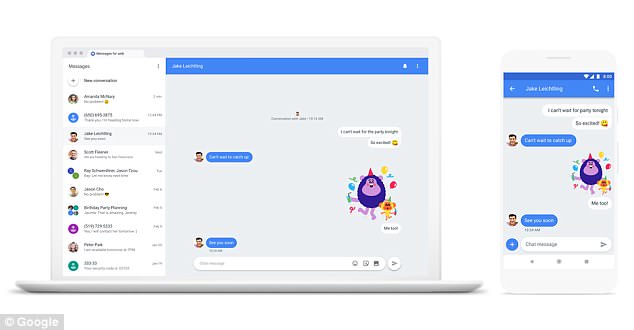
Android smartphone owners can now send and receive text messages from their computer.

The new feature, which rolled-out worldwide last night, means users can continue to send and receive messages in their text threads even when their phone isn’t to hand.

Text, photographs, and stickers are all supported in the web browser version of Android Messages.

The new functionality brings Google‘s offering up to par with the likes of WhatsApp, which offers a mobile app and web browser component, and Apple’s iMessage, which has iPhone, iPad, Apple Watch, and macOS apps for the messaging service.

To load text threads and contacts into the web browser interface, users need to scan the QR code on the website a dedicated function inside the Android smartphone app

As soon as the scan is complete and the computer is ready to send texts, the smartphone will vibrate.

Android Messages contacts and conversation history will then be loaded inside the browser window.

Unread messages will be shown with a red dot next to the Messages icon in the browser tab.

It’s possible to login to Android Messages to any number of different machines using this method, however, users will only be able to send texts from one computer at a time.

As soon as users open Messages for web on a computer, their text conversations on any other computers or browser tabs will become inactive.

HOW DO YOU SEND AND RECEIVE ANDROID MESSAGES ON A DESKTOP COMPUTER?

To send and receive text messages sent to your Android smartphone on a desktop computer, you’ll first need to ensure you are running the latest version of the Android Messages app.

Head to the Google Play Store on your handset and check for any available updates to the software.

Once that has downloaded, you’ll need to navigate to messages.android.com on your desktop computer or laptop.

It’s worth nothing that Android Messages will only work on Google Chrome, Mozilla Firefox, Safari, or Microsoft Edge web browsers.

So, Internet Explorer fans will have to download a new browser.

Once the Messages website loads, you will be presented with a QR code.

To scan the QR code in Android Messages, tap the three-dot icon in the top right-hand corner of the smartphone app, and hit the option marked ‘Messages for web’.

This loads a camera interface, which you need to point at the QR code.

When the scan is complete and the computer is ready to use, your Android smartphone will vibrate.

Android Messages contacts and conversation history are then loaded inside the browser window.

Unread messages will be shown with a red dot next to the Messages icon in the browser tab.

It’s possible to login to Android Messages to any number of different machines using this method, however, you will only be able to send and receive texts from one computer at a time.

As soon as you open Messages for web on another machine, text conversations on any other computers or browser tabs will become inactive.

Messages for web still sends its messages via the Android smartphone app, so any costs that would be incurred by sending a text from the smartphone will still apply.

That’s definitely something to remember when sending texts internationally from a web browser.

This is completely different to rival WhatsApp, which does not send SMS messages but instead uses an internet connection.

As a result, international text messages are free.

The same applies for iPhone owners when texts are sent to other Apple-branded devices, these so-called iMessages have a blue colour bubble and are sent over an internet connection, not a cellular one.

As a result, WhatsApp and iMessage are both end-to-end encrypted for added security and privacy.

Google says the latest conversation threads, contacts, and other settings in Messages for web will be encrypted and cached on the browser. However, SMS messages are not end-to-end encrypted.

Android Messages Product Management Director, Sanaz Ahari said: ‘With Android Messages, we’re creating a messaging experience that’s available on multiple devices, lets you share whatever you want to share, and makes it easy to take action on your messages with Google AI.

‘Today and over the next week, we’ll begin rolling out Messages for web, one of our top-requested features that lets you send and receive texts from your computer.’

Alongside the launch of Messages for web, Google has also ushered in a smaller update to its Messages app on Android smartphones.

Android Messages will now automatically identify authentication codes sent from a bank, online account, or mobile apps and let users copy the data from the notification.

This should speed-up authentication of banking apps, and other services.

Apple is bringing the same functionality to its iMessage service with iOS 12, which will become available to iPhone, iPad and iPod Touch owners later this year.

Source:Dailymail
Two Britons arrested over Microsoft hack
Cambridge University scientists create fuel from ‘artificial leaves’
Ghana Robotics Competition 2024: Students showcase innovative creations
Forbes, Busy internet launch entrepreneurship-driven online channel, Forbes8
Bolt rolls out safety feature to monitor stalled trips in Ghana
TAGGED:Android
Share This Article
Facebook Email Print
Share
Previous Article NABCO to give disabled people special treatment – Anyars
Next Article Johnson and Johnson sponsors prostate cancer campaign on Father’s Day

Starr 103.5FM

Starr FMStarr FM
Follow US
© 2024 EIB Network Ltd. All Rights Reserved.
newsletter icon
Join Us!
Subscribe to our newsletter and never miss our latest in news, podcasts etc..

Zero spam, Unsubscribe at any time.
Welcome Back!

Sign in to your account

Username or Email Address
Password

Lost your password?